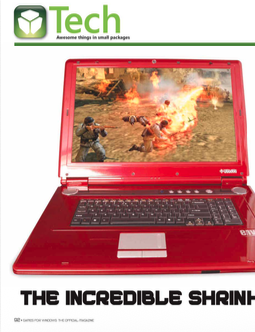
The Incredible Shrinking Game Machine!
Games for Windows: The Official Magazine, June 2007
Every few years, we dream about cramming a full desktop gaming experience into a notebook computer. Just imagine it: a fully equipped gaming rig that weighs less than most people’s monitors. What keeps getting in the way? Progress—there’s the rub. Your standard-issue desktop PC can change with the times. Just pop in the latest gee-whiz card du jour and you’re caught up. Notebooks haven’t been able to make that claim—at least not yet.
Nevertheless, progress isn’t exactly standing still for notebooks. While going toe-to-toe with desktops remains out of reach, the differences between them—both in power and in price—shrink every day. It’s now possible to get a notebook with at least some upgradeability and minimal compromise.
BUYING INTO THE DREAM
Building a laptop from scratch is out of the question. Yes, you can do it, with the help of a thousand-dollar bare-bones laptop frame from Asus (www.asus.com) or MSl (www.msicomputer.com), but by the time you’ve configured it for gaming, you’re paying more than you would for a high-end boutique-made machine—and getting less for your money. It just doesn’t make sense.
Consider what the gaming-focused manufacturers are cranking out these days: VoodooPC (www.voodoopc.com) and Alienware (www.alienware.com) constantly duke it out for the title of most powerful laptop. Machines like Voodoo’s Envy W:201 and Alienware’s Area-51 m9750 wedge blazing processors and SLl video into portable form-factors with huge screens. As this arms race escalates, so do prices. Do you have as much as seven grand in the bank to buy a portable computer?
Luckily, it’s now possible to score a solid game machine from even the most vanilla corporate outlet. By taking just a small step down you can save as much as $4,000. Companies like Gateway and Dell are putting out reasonably competent machines for half, or even a third, of the price.
So, should you even buy a notebook computer? Well, that’s a question only you can answer. You need to go in understanding not just your own needs but the benefits and limitations of what’s out there. Lucky for you, we’ve done a lot of the legwork. Here’s a lightning-fast breakdown of what you need to find under the hood if you’re hoping to score an all-around solid machine that won’t break the bank.
Screening Room. Don’t settle for less than a 17-inch WXGA+ (1680×1050) LCD—and moving up to a WUXGA (1920×1200) resolution is usually a small jump in price. Keep in mind that getting games running silky-smooth at high resolutions requires a little extra money and video muscle.
Graphic Violence. When it comes to graphics cards, one maxim holds true: With great power comes an even greater price tag. To feed that image-hungry screen you’re going to want a 256MB GeForce Go 7900 GS. Step up to the 512MB Go 7950 GTX and you’ll get solid desktop-like performance. As of press time, SLI (scalable link interface) notebooks are available that double your performance—like SLI does on desktops—and it’ll only cost you an additional $400. Only? Yeesh! Then there’s the small matter of mobile Direct 10-friendly graphics cards—as in you won’t see one in a computer until early this summer. So all you Crysis-crazed gamers might want to hang back a couple months.
Brain Power. The prices for processors vary a bit more here, but a 2GHz Intel Core 2 Duo will do just fine; you can move up to a 2.16GHz chip for a nominal charge, but beyond that you’re going to start paying the bleeding-edge tax. It’s probably not worth making the upgrade until the 2.33GHz CPUs start coming down in price.
Sweet Memory. When it comes to RAM, look for at least 1GB on a single DIMM, though many manufacturers are offering 2GB for a reasonable premium. Just don’t make the jump to 4GB of RAM. That “bigger, better, faster, more!” mentality doesn’t jive because you get seriously diminished returns on your money.
Hard Driven. What is worth extra cash is a 7,200-rpm hard drive. Available at 100GB sizes, 7,200-гpm drives pick up the pace.
Wirelessness. Though it may or may not be a big deal to you, be on the lookout for notebooks that offer 802.11n support. Afraid you might be jumping on the “n” bandwagon a little too soon? Some mixed-standard devices still work with 802.11a, b, and g standards.
The Bottom Line. All this can be yours for a reasonable price—a mere $2,000 should buy you a notebook with the specs you have here. It won’t blow your eyeballs out, but it’ll hold its own with reasonably recent games. Also, consider protecting your mobile investment (being on the road means added potential for damage) with a warranty. Just make sure to do your research as to what you need and what exactly the warranty covers.
NEW LIFE FOR OLD GEAR
Now, perhaps you don’t have a spare two (or three or seven) grand lying around the house, but you do have a notebook that’s getting on in years. Can that jalopy catch up with the 21st century? Within reason, yes. There’s not much standardization among laptop manufacturers, so there’s not a lot you can tinker with under the hood—but you’d be surprised how much a few smart upgrades can help.
Did you know that the vast majority of laptop hard drives spin at a paltry 5,400 pm, and some even run at 4,200 rpm? By comparison, the desktop standard is 7,200 rpm, and you can find gamer-focused desktop drives at speeds of 10,000 rpm (though laptop drives have yet to achieve this speed). This means that, with a simple hard drive swap, you could boost your access time by as much as 70 percent.
Well, OK, perhaps “simple” isn’t the best way to describe it. If you’re used to the “open, swap, and close” method of replacing desktop components, you may be in for a bit of a shock, but it’s nothing you can’t handle. First, pick up a new hard drive; we recommend the 100GB 7,200-rpm Hitachi Travelstar 7K100 (www.hitachigst.com). Now you’ll need to hunt around on them there Intertubes for the proper way to open your laptop. Since each manufacturer is different, there’s not much we can do to help here; some notebooks offer hard drive access from the bottom of the unit while others require you to remove the keyboard to access the components beneath. Just be prepared with your smallest screwdrivers and a steady hand. You’ll do fine. We believe in you.
You should notice at least a small speed boost upon upgrading your hard drive, but RAM will make your notebook feel like a new machine. It’s just a matter of getting the most performance for your pennies. If your humble notebook boasts the industry-standard 512MB of RAM—or, heaven forbid, 256MB—you need to swap those sticks out stat! Many manufacturers make memory a bit more accessible than the rest of your notebook’s innards, providing handy doors on the underside to access the goods. With RAM as cheap as it is these days (expect to pay around $80 a gigabyte), there’s really no reason not to upgrade.
And what about that videocard? Surely you can just swap that out too, right? Trust us on this one: This is not a road you want to go down. Yes, it’s theoretically possible to upgrade video on a laptop. Some older machines offered upgradeable cards (which are now hopelessly out of date), but aside from that small minority, you’d need to be an electrical engineer to even get started. Of course, there are always other options. For example, you could get yourself a PC card-to-PCI adaptor, allowing you to harness the blazing speed of a PCI videocard (note: not PCle) for a mere $1,000. Or you could track down a dock for your specific machine with similar functions for a similar price…but then you wouldn’t really have a portable machine, would you? Best to leave this one alone. If your laptop’s video just can’t hack it, you’re better off just picking up a new machine.
WAIT AND SEE
Of course, the state of the art’s always changing. As laptop makers embrace smaller, newer technology. today’s king of the mountain could be tomorrow’s castoff. Imminent Direct 10 support is just one factor. The overarching theme among the companies we spoke to is simply more: more memory, more hard drive space, and more support for gaming in general—especially from the manufacturers who have traditionally been less focused on gaming.
“Getting into the gaming market and growing though retail is very important,” says Dave McFarland, a product manager at Toshiba. “We’re working with game developers and gamers. Being mobile and being able to play games is important to us.*
HP’s recent acquisition of gaming-PC powerhouse Voodoo is indicative of this trend. Rahul Sood, chief technologist of HP’s global gaming business, believes laptop manufacturers are going to need to keep raising the bar to support gaming demand. “Vista sales are going to be driven by gaming, I believe,” he says. “As a result of that, you need to have the graphics power to be able to support it.”
For some ideas of what to expect in the near future, we turned to one of our own experts, ExtremeTech.com’s big cheese—Loyd Case. “The real question is ‘how large can notebooks become?'” he says. “We’ve already seen ‘laptops’ with 20-inch widescreens. That’s not a laptop, really, but some kind of weird hybrid desktop-laptop…thing. The sweet spot for high-end laptops will continue to be 17-inch widescreen displays, but as CPUs and GPUs become more capable, we hope to see better 15.4-inch widescreen laptops weighing under six pounds that can handle most future games.” Case also cites LED-lit screens and hybrid or all-Flash hard drives as features to watch for as laptops evolve.
Will we get to the point where laptops can genuinely compete with desktops at similar price points and configurations? “Anything is possible,” says HP’s Sood. “A few years ago, you never would have expected people to carry around this type of graphics power in a notebook in the first place. The industry changes. I’ll never be surprised at what new comes out of the industry.”
(Please see the PDF for the full article as published, with charts, sidebars, and product photos. Oh, but please note that any guidance here is hilariously out of date.)